Local AI Lab Setup: macOS (Ollama)
This series treats your local LLM as a real service, which means the runtime must be stable before you measure anything. macOS is a great lab environment because you can install Ollama quickly and expose the local API without extra networking. The goal here is a clean setup and a verified endpoint, not a deep dive into platform quirks. Once the service is alive, everything else in the series becomes repeatable. Get the runtime running, then return to the main article.
Requirements
- macOS 14 Sonoma or later.1
- Disk space for local models (they add up quickly).
Install Ollama
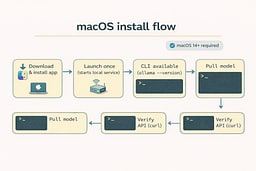
Use the official macOS download so the app and CLI stay in sync.2 The app runs the local server for you, and the CLI makes it easy to pull models and verify the install. If you prefer Homebrew, the Ollama docs call out the supported paths so you can choose the one that fits your workflow. The point is not the installer; it is the service that comes out the other end. Install the app, then verify the CLI exists.
Start the local service
Launch the app once to start the local server, then confirm the CLI responds. The app runs in the background, so you only need to keep it open while you work. If you want a terminal-first workflow, you can run ollama serve manually, but the app is the fastest path. Once the server is running, the API is live. Now we verify it.
Pull a model and verify
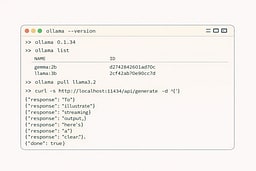
Pull a small model so you can iterate quickly, then run it once to confirm inference works. A first run can be slower because weights are loading into memory, which is normal. The real check is whether the API responds with a streaming result. Use the curl request below to confirm the endpoint is alive.3 Once this works, you're done with setup.
curl http://localhost:11434/api/generate \
  -H "Content-Type: application/json" \
  -d '{
    "model": "llama3.2",
    "prompt": "Say hello to my little friend."
  }'
Common issues
- Connection refused: ensure the Ollama app is running, or start
ollama serve. - Slow responses: start with a smaller model while you build your streaming harness.
Next
Return to the main article for streaming clients and TTFT/throughput measurement: