
AI Code Assistants as Teammates: A Practical Playbook for Day-to-Day Engineering
Transform AI code assistants from unreliable oracles into trusted teammates. Learn the Spec → Tests → AI → Review workflow, three failure modes to avoid, and concrete patterns for leading AI agents effectively in your daily coding sessions.
From Architecture Doctrine To Keyboard Tactics
In the first article, there was a moment where a Saturday morning "I'll just clean this up a bit" turned into watching my AI tools happily refactor, generate tests, and propose new abstractions while I mostly read, steered, and corrected. Somewhere in that session, the job description quietly shifted from "person who writes all the code" to "person who directs the system that writes the code."
If you want the full story, it lives in The Morning I Realized My Job Had Changed.
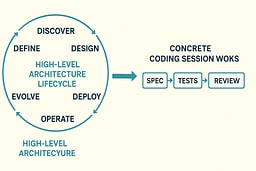
From there, Part 1 introduced the Eight-Stage Lifecycle: Discover, Define, Design, Develop, Deploy, Operate, Evolve, Retire. That article is the doctrine: what your job becomes when code is cheap, how you think like an architect, and how you lead AI agents instead of begging them for code. That model is in The Eight-Stage Lifecycle: Your Architecture Command Center.
This article is narrower and more practical on purpose. We're going to live almost entirely inside Stage 4: Develop—Setting Standards, Leading AI Agents, Reviewing Code and treat it like game tape from a single coding session.
We'll reuse the rate limit example from Part 1, but ignore most of the lifecycle and focus on the hour where you sit down, open your editor, and decide whether the AI is a teammate or an unreliable oracle you keep shipping with. For the lifecycle context, refer back to Stage 4: Develop—Setting Standards, Leading AI Agents, Reviewing Code.
The Three Failure Modes Of AI Assisted Development
Part 1 named some anti-patterns in abstract: Blind copy-paste, Prompt thrashing, Treating AI as an oracle. In real life they show up as specific behaviors in your editor. If you haven't read the high-level version, it lives in Anti-Patterns: What Not to Do. Here we drop into concrete archetypes.
The Oracle User
This is the developer who treats the AI as a remote senior engineer in the sky that "probably knows better." Like asking the ship's computer on the Enterprise for tactical advice and then executing it without running it past the bridge crew first.
Tiny scenario:
"Implement a rate limiter for our API in Node. It should prevent abuse."
They paste that once into their assistant, get 80 lines of code, skim for 4 seconds, and commit it directly. No tests, no invariants, no thought about clock skew, distributed deployment, or interaction with upstream caches.
This maps directly to Treating AI as an Oracle.
At runtime this looks like:
- Prompt is vague or under-specified.
- Assistant returns a plausible blob.
- Human checks "does it run" instead of "does it satisfy the domain invariants we care about."
- Bugs only surface when traffic spikes or a customer gets throttled incorrectly.
The Oracle User isn't "using AI." They're outsourcing judgement. They've essentially handed the helm to the computer and are hoping for the best—which, as any Star Trek episode will tell you, rarely ends well. I've seen this happen in code reviews, and it's always the same story: the code looks fine at first glance, but it breaks in production because no one actually understood what it was doing.

The Prompt Goblin
The Prompt Goblin is the spiritual twin of "Prompt Thrashing: Tweaking Instead of Thinking" from Part 1.
Scenario:
They spend 45 minutes rewriting the same rate limiting prompt, adjusting adjectives like a frustrated novelist trying to get the perfect opening line.
"Be more concise." "No, more robust." "Actually focus on performance." "Wait, make it production-ready." "Actually, can you make it more elegant?"
They never write down explicit requirements, invariants, or constraints. They never commit to a small spec or schema that could anchor the work. It's like trying to navigate by constantly asking "are we there yet?" without ever checking a map.
The behavior pattern:
- More time in the prompt box than in the code.
- No stable definition of "done."
- Repeatedly asking for "better" solutions without defining "better."
- Feeling productive because you're "working with AI" while actually debugging English instead of the system.
You might feel productive. You're not. You're debugging English instead of the system. It's the engineering equivalent of asking the computer to "make it so" over and over, expecting different results each time. I've watched developers spend hours tweaking prompts when they could have written a simple spec in five minutes and been done.

The Skeptic Martyr
Part 1 focused on the dangers of blind trust. The mirror image is the dev who refuses AI completely, partly on principle, partly out of fear or pride. They're the engineering equivalent of someone who insists on navigating by the stars when GPS is available—technically impressive, but unnecessarily difficult.
The Skeptic Martyr:
- Writes everything by hand, even boilerplate and migrations.
- Reviews other people's AI-assisted code with hostility instead of curiosity.
- Becomes the bottleneck for every deadline, because they insist on "doing it properly" but never define a repeatable standard the rest of the team can use.
- Treats AI assistance like it's cheating, as if typing speed were the measure of engineering skill.
They're the runtime version of the behavior implied in Blind Copy-Paste Without Understanding: here the problem isn't copying without understanding, it's refusing help and then blaming the clock.
The Skeptic Martyr is like a starship engineer who refuses to use the diagnostic computer because "real engineers do it by hand," then wonders why they're always behind schedule. There's honor in craftsmanship, but there's also honor in using the right tools for the job.

At the end of this section, the important thing isn't moral judgement. All three archetypes are just what happens when you don't have a positive pattern. Oracle User, Prompt Goblin, and Skeptic Martyr are the on-the-ground versions of the anti-patterns in Anti-Patterns: What Not to Do.
This article exists so "AI as Teammate" isn't a slogan but a concrete alternative. I've been all three of these archetypes at different times, and I know how easy it is to fall into these patterns when you don't have a clear workflow.
A Single Coding Session, Versioned Three Ways
Same rate limiting problem from Part 1, frozen at the Develop stage. Here's how the same coding session plays out three different ways:
Baseline: Solo Developer, No AI
This is the pre-AI baseline. Not wrong, just unleveraged. Like navigating with paper charts when you have a navigation computer available—it works, but you're leaving efficiency on the table.
The session looks like:
You start from the outcome from Stage 1: Discover and Stage 2: Define:
"Protect upstream services from burst traffic while keeping honest users unblocked."
You sketch the spec:
- X requests per window per user.
- Separate limits per route or per API key.
- Clear error semantics.
- Metrics you want to emit.
You write tests first: interface-level tests around a shouldAllow(request) or similar function, plus integration tests against your chosen store (memory, Redis, etc.).
Then you implement. It takes a while. You look at docs, maybe grab a snippet from an old project, but you're the primary generator. You're doing all the heavy lifting yourself, like manually calculating warp field equations instead of letting the computer handle the math.
You refactor once you have green tests and a reasonable design.
This is the control sample. It works. It's disciplined. It also burns time on things AI is decent at helping with, like boilerplate tests and implementation variants. You're essentially doing everything yourself when you could be directing a very fast, very literal junior engineer.

Failure Mode: AI As Oracle
Now replay the same session with the Oracle User at the keyboard. This is what happens when you treat AI like an infallible computer from a 1970s sci-fi show.
Prompt:
"Write a Node.js Express middleware for rate limiting with Redis."
The assistant responds with:
- Hard-coded Redis configuration.
- Global key naming that will explode in multi-tenant scenarios.
- No metrics hooks.
- No tests.
- No consideration for clock skew or distributed deployment.
What happens:
The dev copies the entire answer. They eyeball it for syntax errors. Maybe they run a manual test or two in dev. They ship.
Nothing about the flow references the lifecycle, or the earlier decisions in Discover, Define, or Design. The assistant is treated as a single-shot function: natural language in, production surface out. That's Treating AI as an Oracle in the wild.
The problem isn't AI. The problem is that there's no structure to how AI is used. It's like asking the ship's computer for a solution and executing it without running it past engineering, security, or the bridge crew. Sometimes it works. Often it doesn't. And when it doesn't, you're debugging code you didn't write and don't understand. I've been there—staring at AI-generated code at 2 a.m., trying to figure out why it's failing in production, and realizing I should have reviewed it more carefully when I first accepted it.
Teammate Mode: Spec → Tests → AI → Review
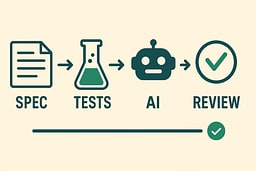
Here's the flow you actually want to institutionalize. This is what it looks like when you treat AI like a very fast, very literal junior engineer who needs clear direction and careful review.
You begin from the same lifecycle context but translate it into in-editor behavior.
Write a Tiny Spec in Code Comments
At the top of your new module or file, you write something like:
/**
 * Outcome:
 * - Limit each API key to N requests per rolling window.
 * - Separate limits for "public" vs "internal" routes.
 * - Return 429 with a standard error payload when throttled.
 * - Emit structured logs on throttle events.
 *
 * Invariants:
 * - Never throttle health checks.
 * - Never throw uncaught exceptions in this middleware.
 * - Must work correctly across distributed app servers.
 */
This is the "Outcome Charter" from Stage 1: Discover expressed locally. It's your mission briefing—clear, concise, and testable. I do this for every new module, even if it's just a few lines. It forces me to think through the constraints before I start asking AI for code.
Ask AI for Tests, Not Implementation
First prompt:
"You are helping me implement the rate limiter described in this comment. Propose a Jest test file that:
- Covers the happy path, throttling behavior, and health check exemption.
- Isolates storage behind a simple in-memory store interface.
- Do not write the implementation yet, just tests and a stub interface."
You paste in the comment plus any existing interfaces.
You expect to edit what you get back, but you let the assistant surface edge cases and structure. You're using AI as a brainstorming partner, not a code generator. It's like having a junior engineer who's really good at thinking through test cases but needs you to validate the approach. I've found this step catches more problems than you'd think—AI will suggest test scenarios you might not have considered, and you can decide which ones actually matter.
Review and Edit Tests as a Human
You go through:
- Remove tests that cover non-requirements.
- Add missing invariants you care about.
- Rename things to match your codebase.
- Tighten assertions to be more specific.
At the end, you have your test suite, just faster. The tests are yours—you own them, you understand them, and they express your requirements. AI helped you get there faster, but you're still the architect. This is where I spend most of my time in the workflow—getting the tests right means the implementation becomes straightforward.
Ask AI for a First Implementation That Satisfies the Tests
Next prompt:
"Now implement the rate limiter to satisfy these tests.
Constraints:
- Extract all storage calls behind an interface so we can swap Redis later.
- No hard-coded secrets.
- Log through our existing logger, not console.log.
- Handle clock skew gracefully in distributed deployments."
You paste in the tests and the relevant interfaces.
Run Tests, Then Review as if a Junior Wrote the Code
When the assistant gives you the implementation:
-
You run the tests.
-
You read the code as if it came from a junior on your team, not a deity.
-
You check for timing bugs, error handling, and readability.
-
You ask the assistant to refactor small pieces if needed:
"Refactor this block into a separate function with a better name,"
"Explain this section in comments,"
"This error handling is too generic—make it more specific."
You're treating AI like a teammate who needs code review, not an oracle whose output is sacred. This is how you maintain quality while leveraging AI's speed. I've caught bugs in AI-generated code that would have made it to production if I'd just accepted it blindly—timing issues, missing null checks, error paths that silently fail. The code runs, but it doesn't handle edge cases the way you need it to. For systematic approaches to debugging AI-generated code, 1 is invaluable.
Use AI to Explore Alternatives, Not Overwrite Everything
If you're unsure about the data structure, you can ask:
"Give me two alternative implementations for the storage layer: one optimized for low memory, one optimized for low latency. Summarize trade-offs."
You compare and decide. That comparison is you doing Stage 3: Design—Exploring Options Before Committing in miniature, inside Stage 4.
This is the pattern we'll name and reuse: Spec First → Tests → AI → Review. It respects your role as architect and uses AI as a power tool, not a vending machine. You're the captain setting the course; AI is the helmsman executing your orders. I use this pattern for every feature now—it's become muscle memory, and it's saved me from shipping code I don't understand more times than I can count.
Patterns That Make AI Feel Like A Teammate (Not A Vendor)
Part 1 argued that you can't lead what you don't understand, and that best practices knowledge isn't optional if you want to direct AI instead of being dragged by it. See:
- Why Best Practices Knowledge Is Essential for Leading AI Agents
- Why You Can't Lead What You Don't Understand
Here are concrete patterns that translate that idea into editor-level behavior. These are the things I actually do when the cursor is blinking and I need to get work done.
Pattern: Spec First Collaboration
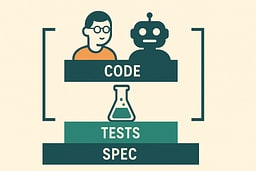
Definition: You write the intent, constraints, and invariants. The AI fills in code and tests inside those boundaries.
How it works in practice:
You write a short spec in comments or a small markdown doc in the repo. You identify the inputs, outputs, and failure modes. Then you ask the assistant:
- "Generate tests that exercise these invariants."
- "Propose an implementation that satisfies this contract."
This ties directly to Stage 2: Define—Turning Outcomes Into Testable Problems from Part 1 and assumes you know enough best practices to say what "good" looks like. See again Why Best Practices Knowledge Is Essential for Leading AI Agents. For deeper guidance on defining clear specifications and boundaries, see 2.
The rule of thumb: the assistant should rarely be inventing your requirements. That's your job. You're the mission commander; AI is the tactical officer executing your orders.
Example:
Instead of: "Write a rate limiter"
You write:
/**
 * Rate Limiter Specification
 *
 * Requirements:
 * - Per-API-key limits: 100 req/min for public routes, 1000 req/min for internal
 * - Rolling window: 60 seconds
 * - Health check exemption: /health, /ready, /metrics
 * - Error response: 429 with Retry-After header
 *
 * Constraints:
 * - Must work across distributed app servers (no in-process state)
 * - Must handle clock skew gracefully (±5 seconds)
 * - Storage interface must be swappable (Redis today, maybe DynamoDB later)
 *
 * Invariants:
 * - Never throw uncaught exceptions
 * - Never block the event loop
 * - Always log throttle events with structured data
 */
Then: "Generate Jest tests that verify these requirements and constraints."
Then: "Implement the rate limiter to satisfy these tests."
You've set the boundaries. AI works within them. This is collaboration, not delegation.
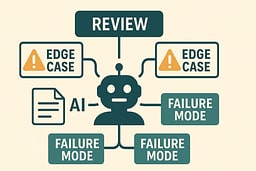
Pattern: AI As Edge Case Generator
Definition: You ask AI to attack your own design.
When you have a working rate limiter, you can prompt:
"Given this implementation and these tests, list 10 edge cases or failure modes we might have missed, especially around distributed deployment, clock skew, and integration with caches or proxies."
Then you decide:
- Which edge cases matter in your environment.
- Which ones you want tests for.
- Which ones belong in Stage 6: Operate—Where Real Behavior Reveals Itself because they only show up under real traffic patterns.
This is connected to Stage 6: Operate—Where Real Behavior Reveals Itself. You're using AI as a rehearsal partner for production incidents. It's like running battle simulations before the actual engagement—you're stress-testing your design before it hits production.
Example:
After implementing your rate limiter, you prompt:
"Review this rate limiter implementation. Identify potential failure modes around:
- Clock skew in distributed systems
- Redis connection failures
- Burst traffic patterns
- Integration with load balancers and CDNs
- Multi-region deployments
For each failure mode, suggest:
- Whether it's a real risk in our environment
- How we could test for it
- How we could mitigate it"
AI generates a list. You review it, prioritize based on your actual environment, and decide what to address now vs. what to monitor in production. You're using AI as a devil's advocate, not a replacement for your judgment.
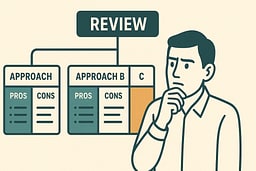
Pattern: Options, Not Orders
Definition: You ask the assistant to propose several options, then you choose and refine.
Instead of:
"Write the rate limiter middleware."
You ask:
"Propose three designs for the rate limiting subsystem given these constraints:
- Stateless app servers behind a load balancer.
- Shared Redis cluster available.
- Need per-key and per-route limits.
For each design, describe trade-offs and which metrics would tell us if it's failing."
This is you pulling Stage 3: Design—Exploring Options Before Committing into the conversation again. I use this pattern whenever I'm unsure about an architectural decision—getting multiple options helps me think through trade-offs I might have missed.
Example:
You prompt:
"I need to implement rate limiting. Here are my constraints:
- 10 stateless Node.js servers behind a load balancer
- Redis cluster available (3 nodes, eventual consistency)
- Need per-API-key limits (100/min) and per-route limits (1000/min)
- Must handle 10,000 requests/second peak
- Latency budget: <5ms overhead per request
Propose three architectural approaches. For each, describe:
- How it works
- Pros and cons
- Failure modes
- What metrics would indicate it's working vs. failing
- Complexity to implement and maintain"
AI generates three options. You review them, ask clarifying questions, maybe combine ideas from different options, and then choose. You're using AI as a design consultant, not a code generator. It's like having a senior engineer propose multiple approaches, then you make the architectural decision based on your context and constraints.
At the end of this section, the important point is: these patterns are what it looks like in your editor when you actually apply the principles in Why You Can't Lead What You Don't Understand and The Human Skills That Keep You Indispensable day to day.
Team Level Rules Of Engagement For AI Code Assistants
Individual discipline is good. Team agreements are better. Part 1 described a Team Leadership Model and the idea of Leading Your AI Agent Army: The Architect's Command Center. See:
- Leading Your AI Agent Army: The Architect's Command Center
- The Team Leadership Model
- The Leadership Paradox
Here is what that can look like as team rules.
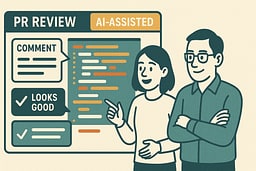
PR Etiquette When AI Wrote Most Of The Diff
Team rule set:
If more than N% of a diff is AI-generated (you choose N—we suggest 50%), the author must:
- Call it out in the PR description.
- Summarize the intent and key invariants in plain language.
- Link to any prompts used for significant design decisions, if your org allows that.
- Explain which parts they reviewed manually and which parts they're confident about.
Reviewers respond as if a junior wrote the code:
- Focus on correctness, clarity, and alignment with standards.
- Ask "what failure modes did you consider" and "which parts did you double-check manually."
- Treat prompts as part of the design doc—review them too.
- Don't accept "AI wrote it" as an excuse for unclear code or missing tests.
This ties back directly to your leadership responsibility as described in Leading Your AI Agent Army: The Architect's Command Center. You're not reviewing AI. You're reviewing a teammate's decision to trust AI in specific places.
Example PR Description:
## AI-Assisted Implementation

~70% of this diff was generated with AI assistance using the Spec → Tests → AI → Review workflow.

### Intent

Add rate limiting middleware to protect upstream services from burst traffic.

### Key Invariants

- Never throttle health checks
- Must work correctly across distributed servers
- Graceful degradation if Redis is unavailable

### What I Reviewed Manually

- Test coverage (all scenarios covered)
- Error handling paths (graceful degradation works)
- Clock skew handling (uses server time, not client time)
- Storage interface abstraction (can swap Redis later)

### Prompts Used

[Link to prompt history if your org allows]

### Areas of Concern

- Redis connection pooling: need to verify under load
- Metrics emission: added structured logging, but want to verify format
This transparency helps reviewers focus on the right things and builds trust that you're not just blindly accepting AI output.
Green Zones And Red Zones For AI Usage
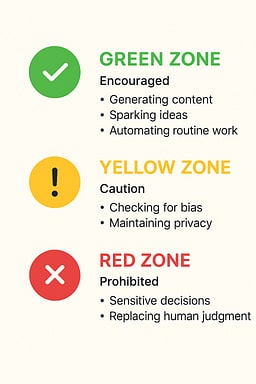
Every team should have a living document that says where AI helps and where it hurts. I've seen teams skip this and pay for it later when AI-generated code causes production incidents in areas where it shouldn't have been used.
Green zone (AI encouraged):
- Scaffolding, internal tools, one-off scripts.
- Test case generation, especially for edge cases.
- Refactoring suggestions that do not change semantics.
- Documentation and comments.
- Boilerplate code (DTOs, API clients, etc.).
Yellow zone (AI allowed with caution):
- Shared libraries, critical domain logic.
- Anything that affects large parts of the codebase.
- Performance-critical paths.
- Integration code with external systems.
Red zone (AI restricted or prohibited):
- Cryptography, auth, billing, legal or compliance logic.
- Anything where a subtle bug is catastrophic.
- Security-sensitive code (authentication, authorization, data encryption).
- Financial calculations or payment processing.
- Code that must comply with strict regulations (HIPAA, PCI-DSS, etc.).
This is your team putting guardrails around Ethics, Security, and Privacy: The Structural Integrity Field from Part 1. Without these zones, you'll end up with AI-generated code in places where a subtle bug could be catastrophic—and I've seen that happen.
Example Team Document:
# AI Usage Zones

## Green Zone ✅

AI assistance is encouraged here. Still review the output, but feel free to leverage AI for speed.

- Internal tooling and scripts
- Test generation (unit, integration, E2E)
- Documentation and README updates
- Boilerplate code (DTOs, API clients, mocks)
- Refactoring that preserves semantics

## Yellow Zone ⚠️

AI is allowed, but requires extra scrutiny and manual verification.

- Shared libraries and utilities
- Domain logic and business rules
- Performance-critical code paths
- Integration code with external APIs
- Database migrations

**Requirements:**

- Must have comprehensive test coverage
- Must be reviewed by at least one senior engineer
- Must include manual verification of edge cases

## Red Zone 🚫

AI assistance is prohibited or requires explicit approval.

- Authentication and authorization
- Cryptography and encryption
- Payment processing and billing
- Legal or compliance logic
- Security-sensitive operations
- Code that handles PII or sensitive data

**Requirements:**

- Must be written and reviewed by humans only
- Must undergo security review
- Must have explicit approval from tech lead
This document should be living—updated quarterly based on what you learn about where AI helps vs. where it causes problems. I update ours after every incident or major project, because the boundaries aren't static.
Pairing & Mentoring With AI In The Room
When seniors pair with juniors in an AI-heavy world, the work changes:
- You're not just reviewing code. You're reviewing how they use AI.
- You ask:
- "What did you tell the assistant?"
- "Which parts did you verify manually?"
- "What invariants are missing from your prompt?"
- You can literally walk through their session history and treat prompts as part of the design doc.
This aligns to the culture and mentoring parts of Part 1: Culture Building and Mentoring. The goal isn't having a team of human compilers. It's having a team of human leaders who can direct automated ones.
Example Pairing Session:
Senior: "I see you used AI to generate this rate limiter. Walk me through your process."
Junior: "I asked it to write a rate limiter with Redis."
Senior: "Okay, let's look at your prompt. I notice you didn't specify distributed deployment or clock skew. Why not?"
Junior: "I didn't think about that."
Senior: "That's exactly what we need to catch. Let's update your prompt to include those constraints, then review what AI generates. This is how you learn to think like an architect—by specifying the hard parts upfront."
Junior: [Updates prompt with distributed deployment and clock skew constraints]
Senior: "Good. Now, which parts of this implementation did you verify manually?"
Junior: "I ran the tests, but I didn't look at the error handling."
Senior: "Let's look at it together. See this catch block? It swallows all errors. In production, if Redis goes down, we'd silently fail open. That's a security issue. This is why we review AI code like we'd review junior code—it's fast, but it doesn't understand our domain."
This is mentoring in the AI age: teaching people to direct AI effectively, not just use it blindly. The goal isn't to make them faster at typing prompts—it's to make them better at thinking through problems and setting clear boundaries. For more on mentoring and team dynamics in technical leadership, see 3 and 4.

Instrumenting AI Usage: Decision Hygiene For Your Codebase
Part 1 talked about Decision Hygiene: Learning from Your Own History, Learning Loops: Compounding Your Skills, and your Career Survival Kit. Here we apply that to AI usage itself.
What To Measure About AI Written Code
You don't need to build a full research lab. Start with:
Defect density: How many bugs per line of code in AI-heavy files vs. hand-written ones.
Time to fix: How long it takes to fix defects in AI-heavy modules.
Revert events: Count "revert AI patch" moments where the team decided code generated by AI was too risky or unreadable.
Review cycle time: How many review rounds AI-assisted PRs need vs. hand-written ones.
Test coverage: Whether AI-assisted code has adequate test coverage (hint: it often doesn't unless you enforce it).
Tie these back to Decision Hygiene: Learning from Your Own History from Part 1. The question isn't "is AI good or bad." The question is "where, in this codebase, does it actually help."
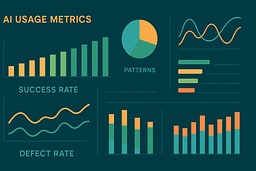
Example Metrics Dashboard:
# AI Usage Metrics (Q4 2025)

## Code Quality

- Defect density (AI-assisted): 0.8 bugs/1K LOC
- Defect density (hand-written): 0.6 bugs/1K LOC
- **Verdict:** AI code has slightly higher defect rate, but acceptable

## Maintainability

- Time to fix bugs (AI-assisted): 2.3 hours average
- Time to fix bugs (hand-written): 1.8 hours average
- **Verdict:** AI code takes longer to fix (less familiar to team)

## Stability

- Revert rate (AI-assisted): 3% of PRs
- Revert rate (hand-written): 1% of PRs
- **Verdict:** AI code more likely to be reverted (needs better review)

## Patterns That Work

- Spec → Tests → AI → Review: 95% success rate
- AI as Oracle: 60% success rate (high revert rate)
- AI for test generation: 98% success rate
- AI for boilerplate: 99% success rate

## Patterns That Don't Work

- AI for security-sensitive code: 40% success rate (high defect rate)
- AI without tests: 55% success rate (high defect rate)
- AI without manual review: 50% success rate (high revert rate)
This data helps you make informed decisions about where to use AI and where to avoid it.
Turning Metrics Into Learning Loops
Once a quarter, sit down as a team and look at:
- Where AI-assisted work reduced cycle time without increasing defect rates.
- Where AI-assisted work caused churn, confusion, or outages.
- Which patterns (Spec First, Edge Case Generator, Options Not Orders) correlate with good outcomes.
Then adjust:
- Update Green and Red zones.
- Update PR etiquette.
- Update your prompt patterns and internal docs.
- Share learnings in team meetings or engineering blogs.
This is what Learning Loops: Compounding Your Skills looks like when pointed at AI usage instead of just humans. I've seen teams skip this step and keep making the same mistakes—measuring once and never revisiting is like calibrating your instruments once and then flying blind.
Example Quarterly Review:
# Q4 2025 AI Usage Review

## What Worked

1. **Spec → Tests → AI → Review workflow**
   - 95% success rate
   - Reduced cycle time by 40%
   - Defect rate same as hand-written code
   - **Action:** Document as team standard, add to onboarding

2. **AI for test generation**
   - 98% success rate
   - Especially good for edge cases
   - **Action:** Encourage for all new features

3. **AI for boilerplate code**
   - 99% success rate
   - Saves ~2 hours per feature
   - **Action:** Continue using, no changes needed

## What Didn't Work

1. **AI for security-sensitive code**
   - 40% success rate
   - Multiple security issues found in review
   - **Action:** Move to Red Zone, require security review

2. **AI without tests**
   - 55% success rate
   - High defect rate
   - **Action:** Require tests for all AI-assisted code

3. **Oracle User pattern (blind acceptance)**
   - 60% success rate
   - High revert rate
   - **Action:** Training session on Spec First workflow

## Updated Guidelines

- **Green Zone:** Add "test generation" explicitly
- **Red Zone:** Add "security-sensitive code" explicitly
- **PR Etiquette:** Require test coverage for AI-assisted code
- **Onboarding:** Add AI usage patterns to new hire training
This turns AI usage from "vibes" into a repeatable, improvable process.
Personal Survival Kit For The AI Heavy Codebase
At the individual level, you can:
- Keep a small log of "AI-assisted bug I missed" and "AI-assisted win that saved me hours."
- Note what you were doing, how you prompted, and which checks you skipped.
- Periodically update your own heuristics and favorite prompt patterns.
This fits neatly into Journaling: Your Compounding Asset and Your Career Survival Kit. The point isn't to feel guilty about mistakes; it's to turn them into reusable knowledge while everyone else is still arguing on social media about whether AI is "real programming." I keep mine in a simple markdown file that I review monthly—it's not fancy, but it works.
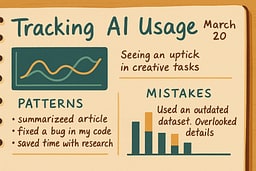
Example Personal Journal Entry:
# AI Usage Journal - Week of Dec 4, 2025

## Wins

- Used Spec → Tests → AI → Review for rate limiter
- Saved ~4 hours on implementation
- Tests caught 2 edge cases I would have missed
- **Pattern:** Spec First works really well for middleware

## Mistakes

- Accepted AI-generated error handling without review
- Bug in production: swallowed Redis connection errors
- **Lesson:** Always review error handling paths manually
- **Action:** Add "review error handling" to my checklist

## Experiments

- Tried "Options, Not Orders" for storage layer design
- Got 3 good options, chose hybrid approach
- **Pattern:** Works well for architectural decisions
- **Action:** Use this pattern for future design work

## Updated Heuristics

- ✅ Always write spec first
- ✅ Always generate tests before implementation
- ✅ Always review error handling manually
- ✅ Use "Options, Not Orders" for design decisions
- ❌ Never accept AI code without running tests
- ❌ Never use AI for security-sensitive code
This personal tracking compounds into better judgment over time, turning you into someone who uses AI effectively instead of someone who just uses AI.
Putting It Back Into The Lifecycle
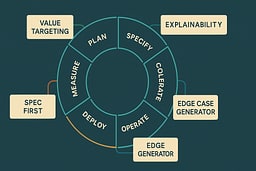
Part 1 gave you the map: The Eight-Stage Lifecycle: Your Architecture Command Center. This article stayed mostly inside Stage 4: Develop, with some intentional bleed into Stage 6: Operate—Where Real Behavior Reveals Itself.
Here's how it fits:
Better Spec First → Tests → AI → Review habits in Stage 4: Develop mean:
- Fewer surprises once you hit Stage 6: Operate—Where Real Behavior Reveals Itself.
- Clearer ownership when something breaks.
- More confidence in the codebase because you understand what AI generated and why.
Using AI as an edge case generator and tracking metrics turns Operate into a feedback machine for Develop, Evolve, and Retire:
- You're more willing to change things in Stage 7: Evolve—Adapting To The World You Discovered because you trusted less magic on the way in.
- You're more confident about Stage 8: Retire—Respectful End Of Life because your systems were built with clear contracts and tests, not opaque blobs.
The goal is that when you glance at the lifecycle diagram from Part 1, you can now mentally overlay concrete behaviors:
- "This is where I write the spec"
- "This is where I ask AI for tests"
- "This is where I use it as a critic instead of a builder"
- "This is where I measure what happened"
You're not just following a process—you're applying tactical patterns at each stage, with AI as a teammate who accelerates execution while you remain the architect.
Conclusion: Two Articles, One Survival Strategy
Taken together, these two articles are one argument.
Part 1—Software Development in the Age of AI: How To Think Like an Engineer When Code Is Cheap—is the strategic half: how your role shifts into architect and leader, how the eight-stage lifecycle works, and how to avoid becoming either an AI apologist or an AI doomer. The wrap-up for that is in Conclusion: From Developer to Software Architect—Leading Your AI Agent Army.
This article is the tactical half: how you behave in your editor so that AI code assistants feel like real teammates, not vendors or oracles. It names the failure modes, offers concrete patterns, and turns vague advice like "don't trust AI blindly" into specific workflows.
If you want a mental slogan, it's this:
- Think like an architect in the lifecycle.
- Work like a lead in your editor.
- Let the AI be a very fast, very literal junior.
There's a natural Part 3 sitting in the wings: AI in the SDLC pipeline—integrating agents into CI, quality gates, and observability safely, hanging off Deploy, Operate, and Evolve. But that's another article.
For now, if you can look at a coding task and instinctively reach for "Spec → Tests → AI → Review" instead of "Ask the oracle and hope," these two pieces will have done their job.
You're not just using AI tools. You're leading an AI agent team. And like any good leader, you set the standards, make the decisions, and review the work. The fact that your team members are very fast and very literal doesn't change that—it just means you can build more ambitious systems while maintaining control over architecture, quality, and long-term operability.
The question isn't whether AI will change how you code—it already has. The question is whether you'll learn to lead effectively, or watch from the sidelines as others figure it out first.
Your choice, your workflow, your future as a Software Architect leading an AI agent team.

Further Reading
Related Articles
- Software Development in the Age of AI: How To Think Like an Engineer When Code Is Cheap — Part 1 of this series, covering the strategic shift to Software Architect and the eight-stage lifecycle.
Books and Resources
-
A Developer's Guide to Integrating Generative AI into Applications — Field-tested playbook for moving generative AI features from prototype prompts to production experiences, covering discovery, retrieval architectures, evaluation loops, and governance patterns.
-
Clean Code: A Handbook of Agile Software Craftsmanship by Robert C. Martin — Foundational principles for writing maintainable code that AI tools can enhance rather than replace.
-
The Pragmatic Programmer: Your Journey to Mastery by Andrew Hunt and David Thomas — Timeless advice on thinking like an engineer, especially relevant when code generation becomes commoditized.
-
Accelerate: The Science of Lean Software and DevOps by Nicole Forsgren, Jez Humble, and Gene Kim — Research-backed insights on what makes high-performing engineering teams, including practices that remain valuable in the AI era.
-
The Art of Unit Testing: with Examples in JavaScript (3rd Edition) by Roy Osherove — Concrete patterns and habits for writing useful tests, not just more tests. Essential when AI generates test code that needs human review.
-
Test-Driven Development: By Example by Kent Beck — The foundational work on TDD, which becomes even more important when working with AI code assistants.
-
Grokking Algorithms, Second Edition by Aditya Bhargava — Visual, beginner-friendly tour through algorithms and data structures that helps you understand the computational thinking needed to effectively direct AI code generation.
-
The Mythical Man-Month by Frederick P. Brooks Jr. — Classic essays on software project management and team dynamics that remain relevant when leading AI agent teams.
-
Clean Architecture: A Craftsman's Guide to Software Structure and Design by Robert C. Martin — Practical framework for building systems that stay flexible as they grow. The dependency rules and boundary patterns are essential when designing systems that AI agents will implement.
-
Team Topologies: Organizing Business and Technology Teams for Fast Flow by Matthew Skelton and Manuel Pais — Modern framework for designing software teams and reducing cognitive load. Essential reading when organizing teams around AI-assisted workflows.
-
Working Effectively with Legacy Code by Michael Feathers — Must-read for anyone inheriting messy systems or refactoring AI-generated code. The techniques for adding tests to untested code are invaluable when reviewing AI output.
-
Debugging: The 9 Indispensable Rules for Finding Even the Most Elusive Software Bugs by David Agans — Short, tactical guide to debugging. Essential when AI-generated code has subtle bugs that need systematic tracking.
Online Resources
-
GitHub Copilot Documentation — Official documentation for GitHub Copilot, including best practices and usage patterns.
-
AI Pair Programming: A Guide — ThoughtWorks guide on effective AI pair programming practices.
-
Prompt Engineering Guide — Comprehensive guide to writing effective prompts for AI systems.
-
Test-Driven Development for AI Projects — Best practices for integrating TDD with AI code generation, including comprehensive test coverage and security-focused testing.
-
AI-Driven Development: Test-Driven AI — Guide to maintaining test independence, descriptive test names, and iterative improvement when using AI in TDD workflows.
-
GitHub Copilot Research: Quantifying Impact — GitHub's research on how AI coding assistants affect developer productivity and happiness.
-
AI Code Assistants Comparison: GitHub Copilot, Cursor, and Claude — Comparison of major AI code assistants, their strengths, and when to use each one.
Industry Reports and Studies
-
Stack Overflow Developer Survey 2025 — Annual survey showing AI tool adoption rates and developer perspectives on AI-assisted development.
-
McKinsey Technology Trends Report — Analysis of how AI and automation are reshaping technology work and engineering practices.
DevOps and Operations
-
The Phoenix Project: A Novel About IT, DevOps, and Helping Your Business Win by Gene Kim, George Spafford, and Kevin Behr — DevOps novel that teaches operations, bottlenecks, and flow. The principles of continuous delivery apply directly to AI-assisted development workflows.
-
The Unicorn Project: A Novel About Digital Disruption, Redshirts, and Rebelling Against the Ancient Powerful Order by Gene Kim — Developer-centered companion story about cognitive load and platform engineering. Essential for understanding how to fight back against technical debt in AI-generated codebases.
-
Release It! Design and Deploy Production-Ready Software (2nd Edition) by Michael Nygard — Definitive guide for production hardening and resilience. Critical when AI-generated code needs to survive in production, not just work in development.
References
[1] Agans, D. J. (2006). Debugging: The 9 Indispensable Rules for Finding Even the Most Elusive Software Bugs. AMACOM.
[2] Evans, E. (2003). Domain-Driven Design: Tackling Complexity in the Heart of Software. Addison-Wesley Professional.
[3] Fournier, C. (2017). The Manager's Path: A Guide for Tech Leaders Navigating Growth and Change. O'Reilly Media.
[4] Reilly, T. (2022). The Staff Engineer's Path: A Guide for Individual Contributors Navigating Growth and Change. O'Reilly Media.

About Joshua Morris
Joshua is a software engineer focused on building practical systems and explaining complex ideas clearly.