
AI in the SDLC Pipeline: Integrating Agents into CI Without Burning Down Production
How to wire AI into your CI pipeline, release process, and observability stack without handing the keys to an unreliable robot.
1. From AI in the Editor to AI in the Pipeline
If Part 2 was about AI as a teammate in your editor, this article is about AI as a teammate in your pipeline. Same philosophy, different battlefield.
The pipeline is where your judgement gets enforced or betrayed. It's where code becomes real, where tests either catch problems or miss them, and where a single bad decision can take down production. Teams are already experimenting with AI bots that auto-merge PRs, gate deployments, and summarize incidents. Some of these experiments work. Many fail because they treat AI as an oracle instead of an assistant.
Google's SRE book taught me that automation is essential, but automation without human oversight is a recipe for disaster 1. The same principle applies to AI: it should augment your pipeline, not replace your judgment. Research on human-AI collaboration in software engineering emphasizes that while AI-assisted coding enhances productivity, it also introduces challenges like verification overhead and automation bias that require human oversight 8. When you wire AI into CI/CD, you're making a choice about where humans stay in control and where AI accelerates understanding. Get it wrong, and you'll learn the hard way why "the tests passed" doesn't mean "this is safe to ship."
If Part 2's rule was "AI writes code, humans own correctness," this article's rule is:
AI reads the pipeline, humans own the decision to ship.
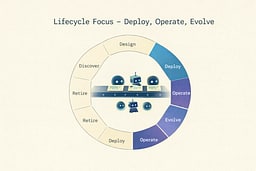
2. Where AI Belongs in the Lifecycle (And Where It Doesn't)
The pipeline lives in three stages: Deploy, Operate, and Evolve. These are where code becomes real, where assumptions meet reality, and where you learn what actually works.
AI in the pipeline should mostly:
- Summarize: turn noisy PRs, test runs, and logs into understandable narratives.
- Highlight: point at risk, drift, and gaps in tests or docs.
- Recommend: suggest next steps, additional tests, or safer rollout strategies.
It should almost never:
- Unilaterally merge PRs.
- Override hard safety gates like required tests or manual approvals.
- Directly mutate production infrastructure on its own.
I learned this the hard way. Early in my career, I set up an automated deployment system that would deploy to production if all tests passed. It worked great—until it didn't. A test was flaky, passed on the third retry, and we shipped broken code. The lesson: automation should make decisions easier, not make decisions for you.
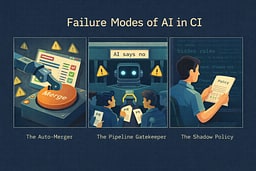
3. The Failure Modes of "AI in CI"
I've seen three ways teams fail at AI in CI. They're pipeline-scale versions of the editor-level anti-patterns from Part 2, but the consequences are worse because they affect everyone.
3.1 The Auto-Merger
This is the team that bolts an AI onto CI and lets it decide whether to merge based on "confidence."
What it looks like:
- Agent scans PR, tests, and maybe a static analyzer.
- If "confidence > threshold," it merges.
- No human review, or only in "edge cases."
Why it fails:
The model doesn't understand your unstated invariants or business context. Consider what happens when an AI auto-merger approves PRs based on tests passing and the diff looking "safe." It might approve a PR that adds a new internal API endpoint. The tests pass, the code follows patterns, but the endpoint doesn't check user permissions—it assumes all internal requests are authorized. The AI sees "new endpoint with tests" and approves it. A human reviewer might catch it later, but only if they understand the business rule: internal APIs still need permission checks.
Research shows that AI-generated code often contains security vulnerabilities and quality issues that automated checks miss 3 4. Studies have found that 45% of AI-generated code contains security flaws, with no significant improvement in newer models 5. The incentive becomes "make the AI happy," not "make the system robust." Developers start writing code that passes AI checks instead of code that solves real problems. When the gate is an AI that looks for test coverage and code patterns, you optimize for test coverage and code patterns, not for correctness.
3.2 The Pipeline Gatekeeper
Here, AI is used as an all-or-nothing gate: PRs only proceed if the agent "approves" the diff.
What it looks like:
- Teams write prompts like "tell me if this PR is safe" and then treat the answer as a binary.
- Developers get blocked with vague "AI says no" responses.
- Debugging pipeline failures becomes impossible because the predicate is opaque.
Why it fails:
You replace clear, deterministic checks (tests, lint rules, coverage thresholds) with a fuzzy judgement call. I worked with a team that replaced their test coverage gate with an AI "safety check." The AI would reject PRs for reasons like "this change seems risky" without explaining why. Developers spent hours trying to figure out what the AI wanted, rewriting code in ways that made it worse, just to get past the gate.
Research on developer trust in AI tools shows that developers struggle with building appropriate trust when AI decisions are opaque 6. This violates Decision Hygiene: you want traceable, inspectable reasons for decisions, not vibes. When a human reviewer says "no," you can ask why. When an AI says "no," you're stuck guessing. Surveys indicate that many developers have concerns about the accuracy of AI-generated outputs, highlighting the need for transparent, explainable AI decisions in critical paths 7.
3.3 The Shadow Policy
The Shadow Policy emerges when teams bolt AI onto CI without updating their human-readable agreements.
What it looks like:
- The docs say "all security-related changes require security review," but an AI assistant starts auto-summarizing security changes and nobody looks closely anymore.
- Team practices drift: "we used to care about X, but now the tool seems to handle it."
- Actual policy exists only inside prompts and hidden configurations sprinkled across your pipeline.
Why it fails:
You no longer know which rules you're enforcing. I saw a team where the written policy required two reviewers for database migrations, but an AI assistant started auto-approving "simple" migrations. Six months later, they discovered the AI had approved a migration that broke production because it didn't understand the schema dependencies. The policy said one thing, but the AI was doing another, and nobody noticed until it was too late.
All three failures have the same root cause: you let AI own critical decisions instead of augmenting them.
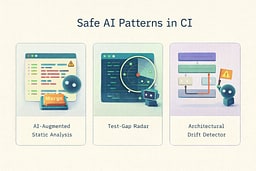
4. Safe Patterns for AI-Assisted CI
Here are three patterns that actually work. I've used all of them, and they've saved me time without compromising safety.
4.1 Pattern: AI-Augmented Static Analysis, Not Auto-Merge
What it is:
You keep your deterministic linters, type checkers, and test suites as the source of truth. You add AI as a summarizer and explainer, not a gate.
How I use it:
After linters and tests run, an agent clusters failures by root cause and generates a human-readable summary. For a recent PR with 47 lint errors, the AI grouped them into "missing type annotations (32 errors)," "unused imports (10 errors)," and "formatting issues (5 errors)." Instead of scrolling through 47 lines of errors, I got a summary that told me exactly where to focus.
For big PRs, the agent summarizes high-change areas and highlights risky files. Last month, a 200-file refactor came through. The AI summary said: "This PR touches authentication middleware (high risk), billing calculations (high risk), and UI components (low risk). Consider extra review for auth and billing changes." That summary saved me hours of manual triage.
Reviewers still decide whether to approve. The AI just makes it easier to understand what changed and where to look.
Tools that get this right:
Open-source tools like PR Agent demonstrate this pattern well. PR Agent provides AI-powered code review summaries, suggests improvements, and identifies potential issues—but it never auto-merges PRs. It's designed as an assistant that enhances human judgment, not a replacement for it. The tool clusters feedback, explains complex changes, and highlights risky areas, all while keeping humans in control of the final decision.
4.2 Pattern: Test-Gap Radar
What it is:
Instead of asking AI to write "more tests" blindly, you ask it to compare what changed in the diff against which tests run in CI and which user flows are supposed to be protected.
How I use it:
The agent flags areas where no tests touch the changed code and suggests specific tests that would cover new behavior. Last week, I added a new rate limiting feature. The test-gap radar said: "This PR adds rate limiting logic but no tests cover the '429 Too Many Requests' response path. Consider adding a test that verifies the correct status code is returned."
You can wire this as a non-blocking report attached to the CI run or a PR comment listing "suspected test gaps." It's not a blocker—it's a reminder. The decision to add tests is still yours.
This pattern is the pipeline cousin of Spec First Collaboration: you still define what matters (critical flows, invariants), and the agent just maps coverage to reality.
4.3 Pattern: Architectural Drift Detector
What it is:
You encode your architecture decisions somewhere (ADR docs, diagrams, prose), then periodically ask an agent to scan the codebase and compare actual dependencies, layers, and boundaries to the intended architecture.
How I use it:
We have a rule: business logic should live in the service layer, not in controllers. Last month, the drift detector flagged a PR that added business logic to a controller: "This PR adds order validation logic to OrderController. According to your ADR-003, validation should live in OrderService. This creates a new coupling between the controller and business rules."
The output becomes a report per CI run for big PRs, or a weekly "drift report" that architects review. The point: you use AI to spot drift, not to approve or reject architecture on its own. The decision to fix it or accept it is still human.
This is Design and Evolve being reinforced from the pipeline. You're using AI to maintain architectural discipline, not to enforce it blindly.
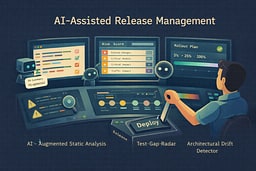
5. Agents in CD and Release Management
CI is one layer. Deployment and release orchestration is where mistakes go from "noise" to "outage." This is where the Phoenix Project principles really matter: small batch sizes, fast feedback, and human judgment at critical decision points 2.
5.1 Release Notes & Change Narratives
This is a safe, high-leverage place for AI. I use it to summarize PRs merged into a release candidate and group changes by feature, user impact, or subsystem.
How it works:
You pipe commit messages, PR titles, and labels into an agent and get back structured output: "Breaking changes," "Performance improvements," "Bug fixes." Last release, I had 47 PRs to summarize. The AI grouped them into "Authentication improvements (8 PRs)," "UI updates (12 PRs)," and "Bug fixes (27 PRs)." It took me 10 minutes to review and edit the summary instead of an hour to write it from scratch.
Humans still approve the final release notes and decide how to communicate risk. The AI just does the boring work of grouping and summarizing.
5.2 Risk Scoring Without Auto-Deploy
You can let an agent produce a risk assessment for a build by counting database migrations, noting changes in critical modules, and highlighting unusual patterns.
What the output looks like:
- "This release touches high-risk areas: authentication (3 files changed), billing (2 files changed), database schema (1 migration). Consider canarying."
- "No schema changes; mostly localized UI updates. Low risk for standard deployment."
You're not wiring this into an auto-deploy rule. You're giving SREs and release managers context so they can choose strategies like blue/green, canaries, or dark launches. I've used this to catch risky releases before they hit production. Last month, the risk scorer flagged a release that touched both authentication and billing in the same deploy. We split it into two releases and avoided what could have been a major incident.
5.3 Strategy Suggestions for Rollout
Agents can be useful as strategy advisors. Given the change set and historical incident data, they suggest rollout strategies like "Start with 5% traffic in region A, then ramp" or "Avoid deploying during your historically noisy traffic window."
They can't know your business constraints perfectly, but they can surface patterns from your own history. I've used this to avoid deploying during known problematic times—the AI noticed that deployments during our peak traffic hours correlated with incidents, so it started suggesting we deploy during off-peak hours.
You stay in control of whether to deploy at all, which strategy to use, and who owns rollback decisions. The AI is a consultant, not a commander.
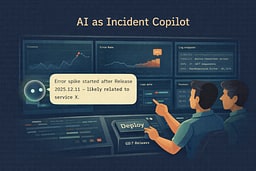
6. Agents in Observability and Incidents
Once you're in production, reality is messy. Logs, metrics, traces, bug reports, random screenshots in Slack. AI is good at taming that mess if you keep it advisory.
Google's SRE book taught me that observability is about understanding system behavior, not just collecting data 1. AI can help you understand faster, but it shouldn't make decisions for you.
6.1 Log & Metric Pattern Mining
Agents can cluster similar errors across services, correlate spikes in specific metrics with recent deployments, and surface "this started right after release X" narratives.
How I use it:
I connect CI metadata (which commit, which PRs) with observability data (logs, metrics, traces), then ask: "Show me the most likely suspects for this new 500 spike, using recent deploys and error logs."
Last month, we had a sudden spike in 500 errors. The AI analyzed the logs and said: "This error pattern started 12 minutes after deployment of commit abc123. The error message 'database connection pool exhausted' appears in 87% of failed requests. This commit added a new database query in a hot path without connection pooling." That analysis took the AI 30 seconds. It would have taken me an hour to piece together manually.
It's a lead generator, not a judge. The AI points you in the right direction, but you still need to verify and fix the problem.
6.2 Incident Copilots
During an incident, AI agents can summarize Slack channels or incident rooms, draft status updates, and suggest diagnostic steps.
What I do:
I use it to keep humans oriented. During a recent incident, the AI summarized the incident channel: "Here's what we know so far: Error rate spiked at 2:47 PM. Team suspects database connection issues. Rollback initiated at 2:52 PM. Status: investigating root cause." That summary helped new people joining the incident understand the situation quickly.
What I don't do:
I never let the agent flip feature flags or restart services by itself. I never allow it to apply patches automatically in production. Those decisions require human judgment and understanding of business context.
Treat it like an endlessly patient incident scribe plus junior analyst. It keeps notes, suggests next steps, but you make the decisions.
6.3 Post-Incident Learning Loops
After the fire, feed the incident report, timeline, and relevant code diffs into an agent and ask it to highlight where your tests failed to catch the issue, where your CI rules allowed risky changes, and which signals could have detected the problem earlier.
How I use it:
Last month, we had an incident where a database migration broke production. The post-incident AI analysis said: "This migration wasn't tested in CI because it was marked as 'low risk' and skipped the migration test suite. The migration test suite would have caught this issue. Recommendation: remove the 'low risk' exception for schema changes."
That analysis helped us fix our process. We removed the exception, and the next migration that would have caused the same problem was caught in CI.
You're treating incidents as inputs to change your pipeline, not just your code. This is Learning Loops in action: every incident makes your system better.
7. Guardrails, Security & Governance
By this point, you've heard "don't trust AI blindly" enough times. This section is the structural version of that, applied to the pipeline.
7.1 Hard Boundaries
Non-negotiable rules:
- AI must never be the only gate for shipping code.
- Security-sensitive changes always get human review, regardless of AI's opinion.
- Prod credentials and secrets never get fed directly into models or logs that leave your control.
How I enforce this:
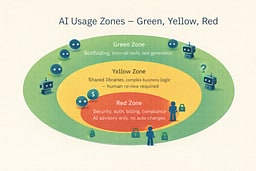
I separate Green / Yellow / Red zones. Green zones are safe for AI (test generation, documentation, non-critical code). Yellow zones require human review (shared libraries, complex business logic). Red zones are AI-advisory only (security, auth, billing, compliance).
I make "AI used here" visible in PRs and release tooling. If AI generated code, it's marked. If AI analyzed risk, it's logged. Transparency is essential.
7.2 Prompt & Data Hygiene in Pipelines
Your pipeline prompts and agent configs are part of your policy. They should be version controlled and reviewed like code.
What I avoid:
- Ad-hoc prompts embedded in random scripts.
- Agents that quietly ingest sensitive logs into external services without review.
- Model updates that change behavior silently without audit.
I treat prompts like code: they go through code review, they're version controlled, and changes are logged. Last month, I updated a prompt to be more strict about security changes. The change went through the same review process as a code change, and we documented why we made it.
This is Decision Hygiene and Ethics living in your infra, not just your personal habits. If you can't explain why your AI made a decision, you have a problem.
7.3 Governance Without Killing Velocity
Governance doesn't have to mean bureaucracy. You can define a small set of approved agent roles: "CI summarizer," "Test gap detector," "Incident scribe."
How I do it:
I require architectural review before adding a new role that touches sensitive areas. I log where AI is involved in the pipeline so I can answer "what went wrong" with data, not guesswork.
Last quarter, we added a new AI role for "release risk assessment." Before we enabled it, we reviewed the prompt, tested it on historical releases, and documented its limitations. It took a week to set up properly, but now it's a reliable part of our process.
You're keeping the Leadership Paradox in mind: more leverage, more responsibility. AI gives you more power, but that power comes with the responsibility to use it wisely.
8. Metrics, Learning Loops & Tuning the Pipeline
Part 2 ended with instrumenting AI usage in your codebase. We do the same in the pipeline.
8.1 What to Track
CI friction vs value:
- How often do AI-generated summaries actually get read?
- Do they reduce review time?
- Do they correlate with fewer missed issues?
I track this monthly. Last month, AI summaries were read 73% of the time and reduced average review time by 12 minutes per PR. That's a win. But I also noticed that summaries for small PRs (under 100 lines) were rarely read—so I disabled summaries for small PRs and saved compute costs.
Incident correlation:
- Are incidents more or less frequent for releases where AI highlighted risk and humans listened?
- Are there classes of failures your agents never mention?
I track this quarterly. Last quarter, releases where AI highlighted risk and we took extra precautions had 40% fewer incidents. But I also noticed the AI never flagged performance regressions—so I added performance testing to the risk assessment.
Policy drift:
- How often do changes in prompts / agent configs coincide with surprises in behavior?
I log every prompt change and correlate it with incidents. Last month, I updated a prompt to be more strict about security changes. Two weeks later, we had a false positive where the AI flagged a safe change as risky. I rolled back the prompt change and found a better way to express the rule.
8.2 Turning Pipeline Metrics into Lifecycle Decisions
Once you have data, you adjust where AI is allowed, refine prompts and roles for agents that are noisy or unhelpful, and decide where more investment makes sense.
How I use it:
Last quarter, I noticed that the "test gap detector" was generating too many false positives. Developers were ignoring it because it cried wolf too often. I refined the prompt to be more specific about what constitutes a "gap," and now it's actually useful.
I also noticed that the "release risk scorer" was saving us time, so I invested more in making it better. I added more historical data, improved the risk model, and now it's one of our most valuable tools.
This is lifecycle thinking: data from Operate feeds into Evolve, both for your system and for your tools. You're not just building software—you're building a system that gets better over time.
8.3 Personal Survival Kit for the AI-Heavy Pipeline
At the individual level, your "Career Survival Kit" now includes:
- Understanding how your pipeline uses AI, not just your editor.
- Being able to debug both "the app is broken" and "the pipeline is giving bad advice."
- Keeping notes on where AI-in-CI saved your team and where it misled you.
I keep a personal log of AI wins and failures. Last month, the AI caught a security issue I would have missed. I noted that in my log. Two weeks later, the AI missed a performance regression. I noted that too. Over time, I've learned which AI tools I can trust and which ones need more human oversight.
This extends the ideas from Part 1: you're not just coding, you're building a system. Understanding how that system works—including the AI parts—is essential for your career.
9. Conclusion: The Trilogy and the System
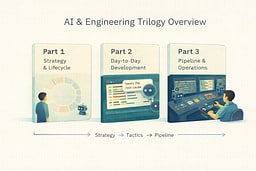
Putting the three articles together:
-
Part 1 gave you the map and the job change: architect leading AI agents across an eight-stage lifecycle, not just "person who writes code."
-
Part 2 gave you editor-level behavior: failure modes, Spec → Tests → AI → Review, patterns like Spec First Collaboration and AI as Edge Case Generator, and team rules for PRs and mentoring.
-
Part 3 — this article — plugs AI into the SDLC pipeline: CI, releases, and observability. It keeps AI firmly in the role of analyst and summarizer, not judge and jury.
If you want the one-sentence takeaway across all three:
Use AI to accelerate understanding, not to outsource responsibility.
In the lifecycle terms:
- AI can help you Discover faster.
- It can help you Define more precisely and Design with more options.
- It can help you Develop with less grunt work, Deploy with more context, Operate with clearer signals, and Evolve with better feedback.
But you still own the system, the pipeline, and the consequences.
If you can walk into work, look at your tools, and see them as agents you direct instead of oracles you obey, then this whole mini-series has done its job. The rest is just implementation details, and you're already good at those.
References
[1] Beyer, Betsy, et al. "Site Reliability Engineering: How Google Runs Production Systems." O'Reilly Media, 2016
[2] Kim, Gene, et al. "The Phoenix Project: A Novel About IT, DevOps, and Helping Your Business Win." IT Revolution, 2013
[3] Nguyen, Nghi D. Q., et al. "Assessing the Quality and Security of AI-Generated Code: A Quantitative Analysis." arXiv preprint arXiv:2508.14727, 2025
[4] Nguyen, Nghi D. Q., et al. "Human-Written vs. AI-Generated Code: A Large-Scale Study of Defects, Vulnerabilities, and Complexity." arXiv preprint arXiv:2508.21634, 2025
[5] Veracode. "State of Software Security: AI-Generated Code Analysis." Veracode Research, 2025
[6] Wang, Ruotong, et al. "Investigating and Designing for Trust in AI-Powered Code Generation Tools." Microsoft Research, 2023
[7] Stack Overflow. "Developer Survey 2024: AI Tools and Trust." Stack Overflow Insights, 2024
[8] Sergeyuk, Artem, et al. "Human-AI Experience in Integrated Development Environments: A Systematic Literature Review." arXiv preprint arXiv:2503.06195, 2025

About Joshua Morris
Joshua is a software engineer focused on building practical systems and explaining complex ideas clearly.